ScamBook Developer Guide
Acknowledgements
ScamBook was adapted from Address Book 3 (https://github.com/NUS-CS2103-AY2526-S2/tp).
All members used Copilot for auto-complete tool during coding.
All members used Claude for generating tests.
The
InputPatternsystem was adapted from one of our member's Individual Project.
Setting up, getting started
Refer to the guide Setting up and getting started.
Design
Architecture
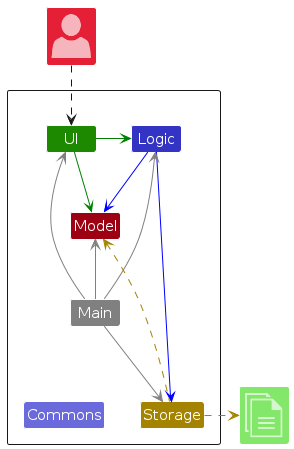
The Architecture Diagram given above explains the high-level design of the App.
Given below is a quick overview of main components and how they interact with each other.
Main components of the architecture
Main (consisting of classes Main and MainApp) is in charge of the app launch and shut down.
- At app launch, it initializes the other components in the correct sequence, and connects them up with each other.
- At shut down, it shuts down the other components and invokes cleanup methods where necessary.
The bulk of the app's work is done by the following four components:
UI: The UI of the App.Logic: The command executor.Model: Holds the data of the App in memory.Storage: Reads data from, and writes data to, the hard disk.
Commons represents a collection of classes used by multiple other components.
How the architecture components interact with each other
The Sequence Diagram below shows how the components interact with each other for the scenario where the user issues the command delete 1.
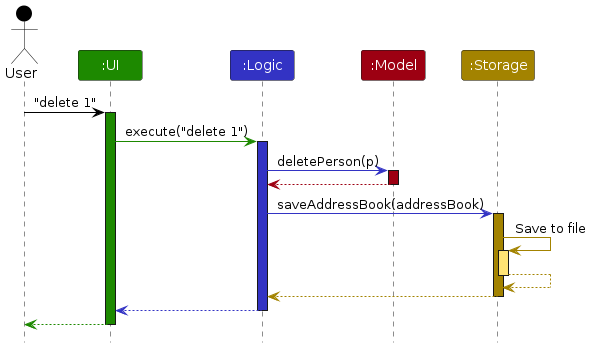
Each of the four main components (also shown in the diagram above),
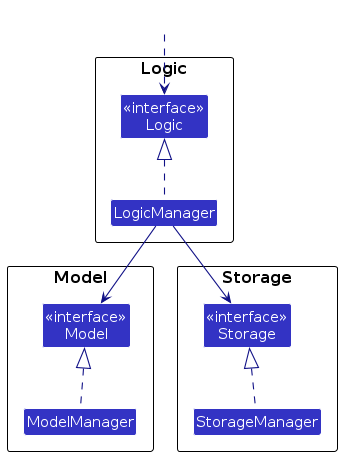
- defines its API in an
interfacewith the same name as the Component. - implements its functionality using a concrete
{Component Name}Managerclass (which follows the corresponding APIinterfacementioned in the previous point.
For example, the Logic component defines its API in the Logic.java interface and implements its functionality using the LogicManager.java class which follows the Logic interface. Other components interact with a given component through its interface rather than the concrete class (reason: to prevent outside component's being coupled to the implementation of a component), as illustrated in the (partial) class diagram below.
The sections below give more details of each component.
UI component
The API of this component is specified in Ui.java
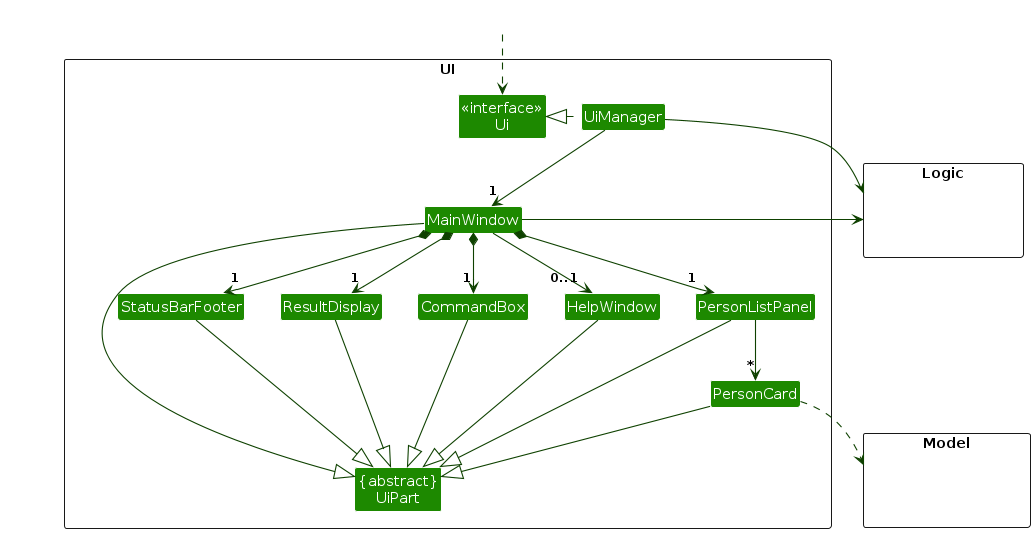
The UI consists of a MainWindow that is made up of parts e.g.CommandBox, ResultDisplay, PersonListPanel, StatusBarFooter etc. All these, including the MainWindow, inherit from the abstract UiPart class which captures the commonalities between classes that represent parts of the visible GUI.
The UI component uses the JavaFx UI framework. The layout of these UI parts are defined in matching .fxml files that are in the src/main/resources/view folder. For example, the layout of the MainWindow is specified in MainWindow.fxml
The UI component,
- executes user commands using the
Logiccomponent. - listens for changes to
Modeldata so that the UI can be updated with the modified data. - keeps a reference to the
Logiccomponent, because theUIrelies on theLogicto execute commands. - depends on some classes in the
Modelcomponent, as it displaysPersonobject residing in theModel.
Logic component
API : Logic.java
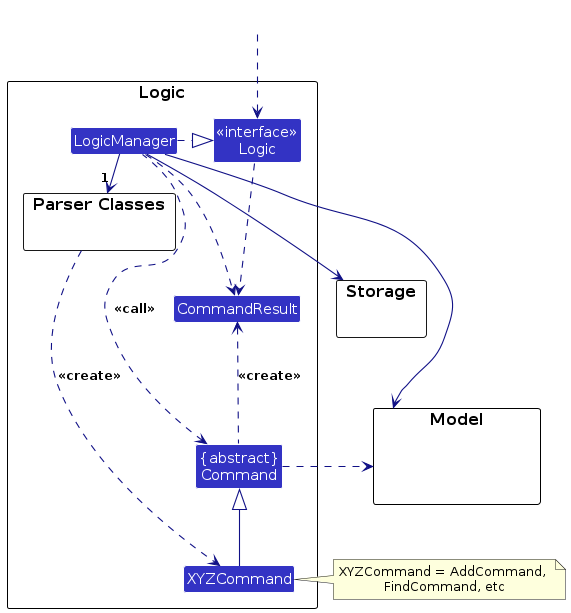
Below is a class diagram of the Logic component:
The sequence diagram below illustrates the interactions within the Logic component, taking execute("delete 1") API call as an example.
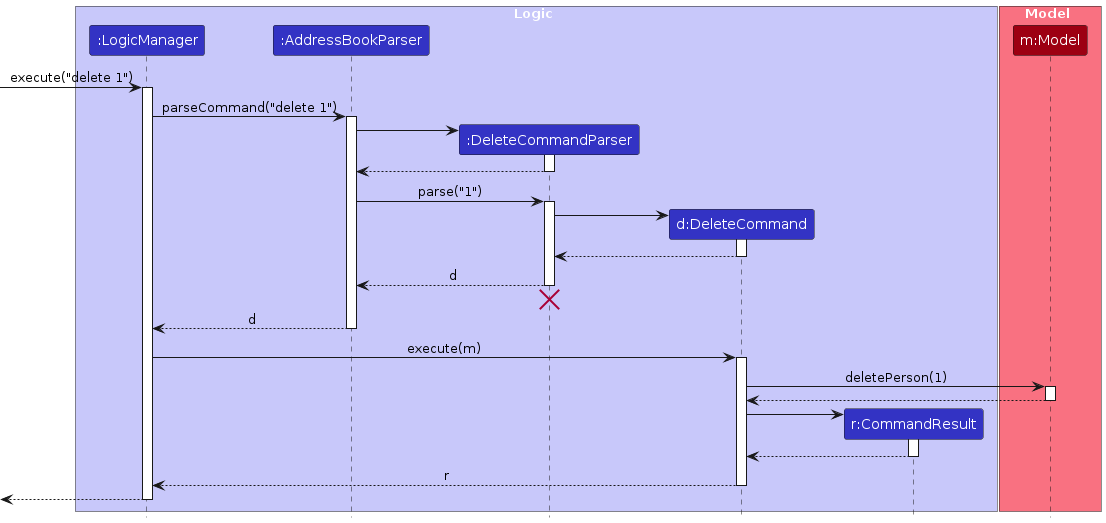
Note: The lifeline for DeleteCommandParser should end at the destroy marker (X) but due to a limitation of PlantUML, the lifeline continues till the end of diagram.
When Logic is called to execute a command, the following happens:
- The command is passed to an
AddressBookParserobject. It checks the first word of the command (known as the command word), and based on that, creates a parser that matches the command (e.g., DeleteCommandParser) and uses it to parse the command. - This results in a
Commandobject (more precisely, an object of one of its subclasses e.g.,DeleteCommand) which is executed by theLogicManager. - The command can communicate with the
Modelwhen it is executed (e.g. to delete a person).
Note that although this is shown as a single step in the diagram above (for simplicity), in the code it can take several interactions (between the command object and theModel) to achieve. - The result of the command execution is encapsulated as a
CommandResultobject which is returned back fromLogic.
Parsing & Input Patterns
The following is a (partial) class diagram for the parser
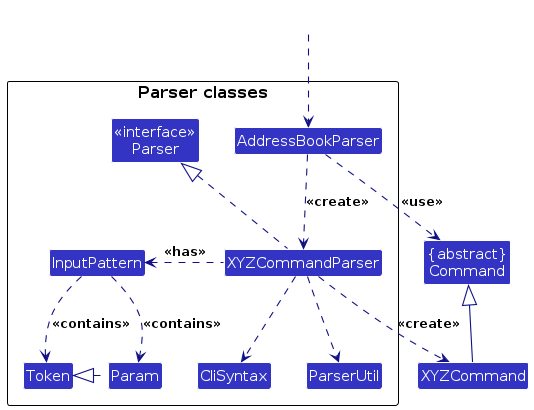
Each Parser contains an InputPattern, which is a specification for the pattern of arguments & parameters this command accepts.
An InputPattern consists of a list of Token and a list of Param.
The list of Token represents the compulsory arguments that come after the command word. The list of tokens is ordered.
Different Tokens accept different inputs, such as Strings, Integers, etc.
The list of Param represents optional arguments that come after the compulsory argument.
These are specified by a param id starting with --. These can be provided in any order.
For example, the add command has the following format add NAME [--phone PHONE] [--email EMAIL] [--tag NAME:VALUE]....
The command has one Token: which takes in the name. It also has 3 Param, which represent the phone, email and tag respectively.
Note that Param has the functionality to specify how many times it can appear in a valid input.
In this case, --phone and --email can appear between 0 and 1 times, while --tag can appear between 0 and 100 times.
Model component
API : Model.java
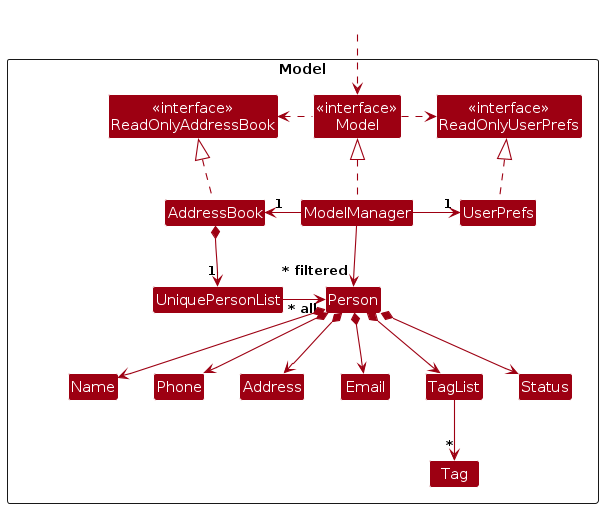
The Model component,
- stores the ScamBook data i.e., all
Personobjects (which are contained in aUniquePersonListobject). - stores the currently 'selected'
Personobjects (e.g., results of a search query) as a separate filtered list which is exposed to outsiders as an unmodifiableObservableList<Person>that can be 'observed' e.g. the UI can be bound to this list so that the UI automatically updates when the data in the list change. - stores a
UserPrefobject that represents the user’s preferences. This is exposed to the outside as aReadOnlyUserPrefobjects. - does not depend on any of the other three components (as the
Modelrepresents data entities of the domain, they should make sense on their own without depending on other components)
Storage component
API : Storage.java
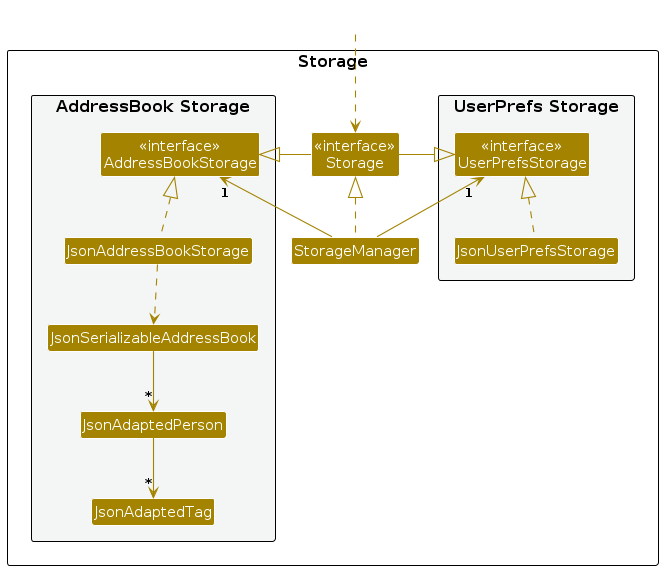
The Storage component,
- can save both ScamBook data and user preference data in JSON format, and read them back into corresponding objects.
- inherits from both
AddressBookStorageandUserPrefStorage, which means it can be treated as either one (if only the functionality of only one is needed). - depends on some classes in the
Modelcomponent (because theStoragecomponent's job is to save/retrieve objects that belong to theModel)
Common classes
Classes used by multiple components are in the seedu.address.commons package.
Implementation
This section describes some noteworthy details on how certain features are implemented.
Input Pattern Parsing
Once the command is received, we denote args as the string that comes after the command word.
Subsequently, we find the first occurrence of a Param id. For example, in the add command,
we find the first occurrence of --phone, --email or --tag as these are the 3 Param it accepts.
If nothing is found, then it is assumed that the entire input contains zero params. From the first occurrence,
we split the args into tokenArgs and paramArgs. These are then parsed separately.
For tokenArgs, we split it into a number of segments by spaces.
Each Token has a function allowSpaces which specifies if it allows spaces or not.
For each token in order, if it does not allow spaces, we assign it to the next segment.
If it allows spaces, we find the first segment that matches the next token, and then assign segments in between to this token.
If during the assigning there are too many or too few tokens, or if any segment does not match
the requirements of a token, a ParseException is thrown.
Note: tokens that allow spaces can lead to ambiguous parsing. It is advised to keep such tokens as the very last token in general. In particular, avoid two tokens that allow spaces beside each other.
For the paramArgs, they are split by the string <space>-- and then assigned one by one.
If a -- does not match the id of any Params, a ParseException is thrown.
Sort feature
The sort mechanism allows users to sort the person list by various fields (name, phone, email, or tag values) in ascending or descending order, with support for numeric or alphabetic comparison modes.
Note that the sort command does NOT use the input pattern methods as mentioned above, since its parameter values are different.
Implementation
The sort feature is implemented through the following key classes:
SortCommandParser— Parses user input and creates aSortSpeccontaining the sort parametersSortCommand— Builds aComparator<Person>and applies it to the modelSortSpec— Value object encapsulating sort parameters (target field, order, mode)
The following sequence diagram shows how a sort operation is executed:
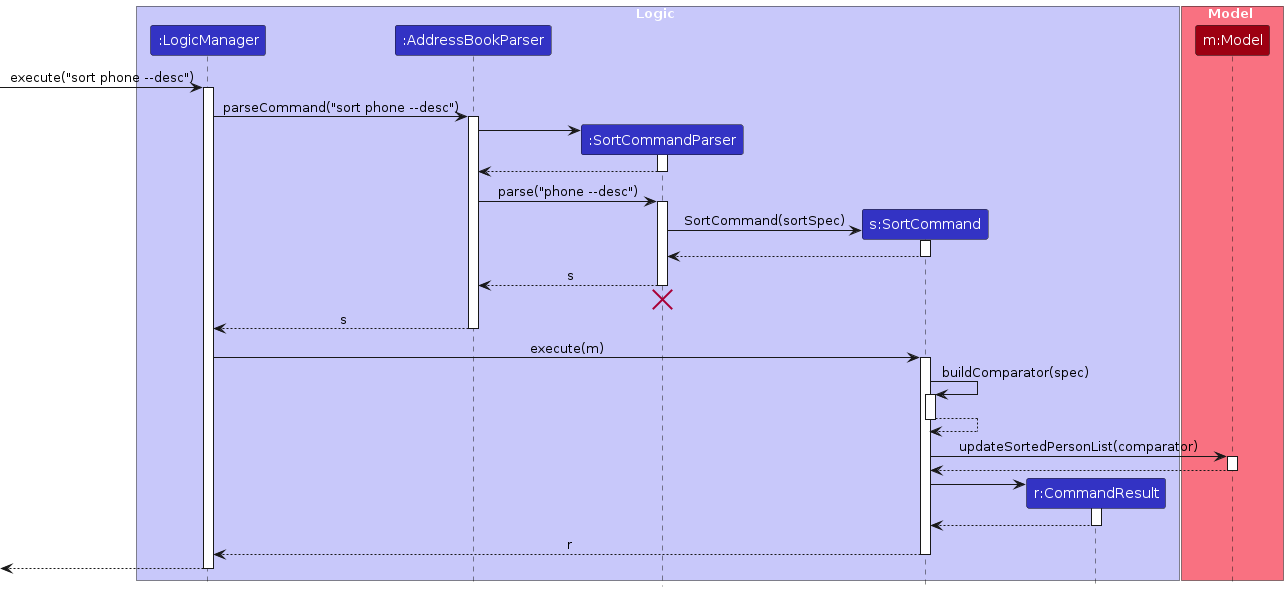
How the sort command works:
- The user issues a sort command (e.g.,
sort phone --desc). SortCommandParserparses the arguments and creates aSortSpecwith the target field (PHONE), order (DESC), and mode (NUMBERby default).SortCommandis created with theSortSpecand executed.- During execution,
SortCommandbuilds aComparator<Person>based on theSortSpec. - The comparator is applied to the view via
Model#updateSortedPersonList(). - The
listcommand resets both the filter and the sort order viaModel#resetSortedPersonList(), restoring the original insertion order.
Design considerations
Aspect: How sort handles null/missing values:
- Current choice: Nulls always sort last, regardless of ascending/descending order.
- Pros: Predictable behavior; missing data doesn't clutter results.
- Cons: Less flexible for users who want nulls first.
Aspect: View-only sorting:
- Current choice: Sort only affects the view layer (
SortedList), not the underlying data.- Pros: Original insertion order is preserved and can be restored with
listcommand. - Cons: Sort order does not persist across sessions.
- Pros: Original insertion order is preserved and can be restored with
Help Window
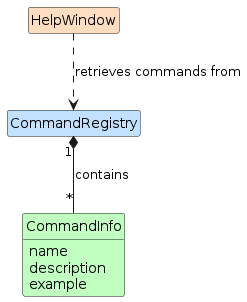
The help text displayed in the help window is generated dynamically using CommandRegistry, which serves as
a central registry of all commands supported by the application. Each command is registered as a CommandInfo
object, which holds the command's name, description, and an optional example string.
Implementation
CommandRegistry stores commands in a LinkedHashMap, preserving insertion order so that commands appear
in the help text in a consistent, developer-defined sequence. It is a non-instantiable utility class accessed
statically, initialized once via a static block at class load time.
CommandInfo wraps three fields:
name— the command word (e.g.add,delete)description— the expected argument format (e.g.INDEX [--name NAME]...)example— an optional usage example shown below the description
When the help window is opened, HelpWindow#buildHelpText() iterates over CommandRegistry#getCommands()
and formats each entry into a fixed-width table, aligning descriptions by padding command names to the
width of the longest registered command. Examples, if present, are indented and prefixed with e.g..
This design means that adding a new command to the registry automatically propagates it to the help window
without any changes to HelpWindow itself.
CommandRegistry also supports the command tooltip feature — when a user types a partial command in the
command box, CommandRegistry#getCommandInfo(commandName) is called to retrieve the corresponding
CommandInfo and display its format as a tooltip (see Entering a Command in the User Guide).
Design considerations
Aspect: How commands are registered:
Current choice: Commands are registered statically in
CommandRegistryvia astaticblock.- Pros: Simple, centralized, and ordered. Easy to see all supported commands at a glance.
- Cons: Adding a new command requires manually updating
CommandRegistryin addition to implementing the command itself.
Alternative: Each command self-registers by calling
CommandRegistry.register()in its own static block.- Pros: Keeps registration co-located with the command implementation.
- Cons: Registration order becomes non-deterministic, and commands that are never referenced may not register at all.
Documentation, logging, testing, configuration, dev-ops
Appendix: Requirements
Product scope
Target user profile:
Phone-call based scam caller who
- is based in Singapore
- executes financial scams
- can type fast
- prefers typing to mouse interactions
- is reasonably comfortable using CLI apps
Value proposition:
- Manages large volumes of scam caller victims' contact information in Singapore
- Flexibility in allowing arbitrary user-defined information to be stored for each victim
- Filter/sort for high-risk / low-reward victims
- Single-user application for security and anonymity
- Full data wipe in case of emergency situations
User stories
Priorities: High (must have) - * * *, Medium (nice to have) - * *, Low (unlikely to have) - *. The features marked as ^ are not implemented at the moment
| Priority | As a … | I want to … | So that I can… |
|---|---|---|---|
* * * | scam caller | create potential victim profile with attached information | I know who to scam next |
* * * | scam caller | delete potential victim profile | I know who not to scam next or who I have scammed |
* * * | scam caller | list potential victim profiles | I can see all potential victims |
* * * | scam caller | quickly append new information about someone I'm calling | I can use that information in the future against that person |
* * * | scam caller | quickly search up personal information about someone I'm calling | I can use that information to gain their credibility |
* * * | sometimes-offline scam caller | access the ScamBook offline | I can work reliably on the go |
* * * | organised scam caller | filter and sort contacts by attributes | I can focus on the best next calls |
* * * | expert user | specify optional parameters with command flags | I have more flexibility when using commands |
* * | new user | view a help menu | I understand what I can do with the product |
* * | scam caller | mark a victim is attempted to call but not tricked | I can avoid calling that person again |
* * | successful scam caller | create custom fields | personalise relevant details for each victim for greater success |
* * | scam caller | edit potential victim profile | I can update victim profile as more information gets known |
* * | beginner user | get help on the commands | I can familiarise myself with the various tools at my disposal |
* * | scam caller | filter by high risk demographics such as old age & high reward demographics like high income | prioritize who I should call |
* * ^ | scam caller | draw and label a relationship from one person to another person | when I scam someone, I can use personal information about another person as bait |
* * | successful scam caller | import and manage a large contact list | I can work with a larger number of victims |
* * | busy scam caller | navigate past commands | I can avoid typing repetitive commands and quickly add new victims |
* * | busy scam caller | see command formats while typing commands | I can quickly and correctly type commands without errors |
* * | beginner scam caller | load and interact with sample data | I have the freedom to try commands without having access to a large victim base |
* * ^ | scam caller | set reminders to follow up calls on victims | I can review which targets need to be called again |
* * ^ | scam caller | view a detailed dashboard of a specific victim | refer to that victim's information during a scam call |
* * | high-volume scam caller | obtain search results quickly even with large numbers of contacts | I am not slowed down during operations |
* * ^ | security-conscious scam caller | have encrypted local storage and auto-lock | sensitive data is protected and secure |
* * ^ | security-conscious scam caller | require logging in for the app | sensitive data is protected and secure |
* | scam caller | purge data immediately | I can wipe my hard disk if I get raided by the police |
* ^ | new user | follow a tutorial | I am guided through the onboarding process |
Use cases
(For all use cases below, the System is the ScamBook and the Actor is the user, unless specified otherwise)
Use case: UC01 - Create potential victim profile
MSS:
User requests to create a new potential victim profile with name and other attributes.
System validates the name and attributes.
System saves the new profile and displays a success message with the created profile summary.
Use case ends.
Extensions:
1a. Victim name is unspecified or invalid.
1a1. System shows an error message indicating the issue with the name.
Use case ends.
2a. Specified attribute(s) is/are invalid.
2a1. System shows an error message indicating the issue with the first invalid attribute.
Use case ends.
Use case: UC02 - Delete potential victim profile
MSS:
User requests to delete a potential victim profile.
System deletes the specified profile and displays a success message with the deleted profile's name.
Use case ends.
Extensions:
1a. Request format is invalid or victim profile is unspecified.
1a1. System shows an error indicating the expected specification format.
Use case ends.
1b. Specified victim does not exist.
1b1. System shows an error indicating non-existent victim and potential remedies.
Use case ends.
Use case: UC03 - Search up victim profile
MSS:
User requests to search for victim profiles by name or other attributes.
System searches stored profiles for matches.
System displays a list of all matching profiles with their stored details.
Use case ends.
Extensions:
1a. Request format is invalid.
1a1. System shows an error indicating the expected command format.
Use case ends.
2a. No profiles match the query.
2a1. System shows an empty list of profiles.
Use case ends.
Use case: UC04 - Sort contacts by tag(s)
MSS:
User requests to sort profiles by specified tag(s).
System validates the specified tag(s).
System displays the sorted list of profiles.
Use case ends.
Extensions:
- 2a. Some profiles do not have the specified tags.
2a1. System moves these profiles to the bottom of the displayed list.
Use case ends.
Use case: UC05 - Append New Information to a Victim Profile
MSS:
User requests to append information to a specified profile.
System validates the specification and the new information.
System updates the profile with the new information and displays a success message with the updated profile.
Use case ends.
Extensions:
2a. No new information is provided or profile is not well specified.
2a1. System shows an error indicating the expected specification or information format.
Use case ends.
2b. The new information is invalid.
2b1. System shows an error indicating the expected information format.
Use case ends.
2c. The new information conflicts with existing information (e.g., trying to append a tag that already exists).
2c1. System shows an error indicating the conflict.
Use case ends.
Non-Functional Requirements
- Should work on any mainstream OS as long as it has Java
17or above installed. - Should be able to hold up to 200 victims without a noticeable sluggishness in performance for typical usage.
- A user with above average typing speed for regular English text (i.e. not code, not system admin commands) should be able to accomplish most of the tasks faster using commands than using a traditional mouse-based Graphical User Interface.
- Should be fully functional without an internet connection.
- Should accept only ASCII characters in user input, and display all stored information in ASCII characters.
Glossary
- Victim Profile: A contact entry representing a potential scam target, containing name, phone, email and custom tags
- Tag: A key-value pair of information attached to a victim profile, e.g.,
job:investment banker,yearly income:$100000 - Mainstream OS: Windows, Linux, Unix, MacOS
Appendix: Instructions for manual testing
Given below are instructions to test the app manually.
Note: These instructions only provide a starting point for testers to work on; testers are expected to do more exploratory testing.
Please follow the setup instructions in the user guide to install and run the app. Assuming no commands have been entered yet, and that the default sample data is loaded, here is a list of commands one could follow, which emulates a realistic scenario of using the app that uses (almost) all commands. All commands should be successful and should result in a success message displayed.
helpadd Bernado --phone 87019942 --tag job:manageredit 4 --email davidli@u.nus.edudelete 6tag 3 --add monthly income:12000 --edit children:5 --delete languagescam 1ignore 2clearstatus 3filter --tag job:managersort monthly incometarget 2listclearexit
Appendix: Effort
ScamBook is a moderate-to-high effort brownfield project adapted from the Address Book 3 (AB3) codebase. AB3 operates within the domain of general contact management, which our project redefines for a much more specific and workflow use case of managing scam victim profiles.
ScamBook improves upon AB3 mainly through providing data and command flexibility, whilst preserving intuitive and
efficient user interactions for the specialised target user profile. AB3 works with a mostly fixed contact schema,
whereas ScamBook allows a much more flexible data model that supports arbitrary sets of user-defined tag name-value
pairs, an additional status state unique to the project domain (scam, ignore, target), and more expressive
commands for view manipulation such as filter, sort, and target.
For these features, validation and parsing, storage, and UI behaviors had to be redesigned so that the data model remained consistent across the entire system. Further, certain more complex features and interactions required careful planning and design to ensure they worked intuitively and efficiently for the use case. For instance:
- Filtering by multiple criterion: How to combine multiple parameter filters (e.g.,
--tag job:managerand--status scam) in a way that is intuitive for users and does not lead to unexpected results. - Sorting by custom tags: How to allow users to sort by arbitrary user-defined tags, which may have different value types (e.g., numeric vs. alphabetic), and how to handle missing values for those tags.
- Interaction between filter and other commands: How do other commands such as
tag,editindex the view after a filter is applied, and whether the filter should be reset or preserved after certain commands (e.g.,addshould reset the filter to show the newly added contact if it does not satisfy the filter, whileeditshould preserve the filter to allow users to continue working with the current view).
The main challenge was preserving AB3's reliability and simplicity while expanding the command language significantly.
This motivated the InputPattern parsing framework and command-flag style inputs to make commands more expressive.
However, this also increased the amount of edge cases to handle, especially for optional repeated parameters and tags
with both names and values.
Another challenge was ensuring that the data model still felt natural in a CLI-first product:
users can add arbitrary tags, update statuses with commands such as scam, ignore, and clearstatus, and then
immediately manipulate the current view with filter, sort, and list without losing usability.
A significant amount of effort, was saved through reuse of the AB3 codebase. The base architecture, JavaFX structure,
storage flow, and some of the testing and infrastructure scaffolding came from AB3, which reduced the cost of setting
up the brownfield project and to focus on ScamBook-specific changes. Additionally, we reused and adapted the
InputPattern system from Rui Yuan's iP implementation, instead of building a command-pattern parser from scratch for
the tP. Even with this reuse, substantial work was required to integrate them into ScamBook's domain and command set,
ensuring that they worked well with the existing architecture and UI, and fixing various bugs and edge cases that arose
from the more expressive command patterns.
Overall, ScamBook's main achievement was turning AB3's fixed-field contact manager into a much more expressive and focused CLI application for the target user profile without compromising the intuitiveness and maintainability of the application and codebase.
Appendix: Planned enhancements
Team size: 5 people
Improve code quality for
sortcommand: The sort command parser does not use the existingInputPatternsystem used by all other commands that have any arguments, as it has somewhat distinct syntax. For improving code quality, we plan to makeInputPatternmore flexible to accommodate thesortcommand's syntax, and future commands that may have more varied syntax.Allow
editcommand to clear name, phone and email fields: Currently, theeditcommand requires the edited name, phone, or email to be another valid value, and the empty string is always invalid. However, there may be use cases when the user wishes to mark one of name, phone or email as null or empty. We plan to add this functionality, for example by allowing users to input--phone ""to clear the phone field.